Monday, January 28, 2019

I Forgot All About This Blog!

I literally forgot all about this blog. I'm going to start posting here again from time to time. I've been taking a lot of photos with my phone lately and I thought I'd share an image from a really cool filter app called Picas.

The app is free to use. The free version does have a small watermark on the bottom corner of the photo and it also has ads. A friend of mine introduced me to this app, and I immediately bought the paid version. I'll post more on this app in the future. For now, here's an image taken with the free version.

My cat. He's so cute! Notice the tiny watermark in the corner. Still really cool for a free app.
 I'll be posting a lot more images from this app in the future and make sure to do a review soon.

Monday, August 11, 2014

LINK: Content Creation and Stock Photography.

Anyone that has blogged for any length of time has come across this problem. You have a story idea but no image to go with it. Sometimes we run into this problem as photographers as well. 9 out of 10 times we will have just the image we need, but occasionally no matter how hard we search our hard drives, that perfect photo eludes us.

When this happens its nice to have access to some free stock photography to use in your designs. Check out this article from The Design Blog on using morguefile.com for stock photography and content creation.

Full article here.

Needed a quick image to create a graphic for a Spanish language blog. Using morguefile.com you can find some great images to use in a pinch.

Thursday, August 7, 2014

Pimp Daddy Caddy

The Grand Daddy, Pimp Daddy, Caddy !
Image shot at vintage car show in Western New York.

Wednesday, August 6, 2014

Can A Monkey Have Copyright ?

I thought this was an interesting take on copyright and a legal battle against wiki commons over this image.

Cute little guy snapped a selfy and now there's a fight over who owns copyright.
Since I started my amateur photography hobby, I've become fascinated by copyright law. So many things I never thought about before, effect copyright. Whether you're an amateur or professional, so many factors have to be considered when profiting from a photo. For instance I never knew you needed property rights when photographing a building or property for that matter.

Then you have all the privacy issues involved in street photography, when you just randomly photograph a person on the street.  Anyway, I thought this was a cute story, and worthy of a post link here. I'm really curious to see which way the court leans. Frankly, I don't think wiki commons has a leg to stand on , but who knows.


Italic text taken from telegraph article.

Wikimedia, the US-based organisation behind Wikipedia, has refused a photographer’s repeated requests to remove one of his images which is used online without his permission, claiming that because a monkey pressed the shutter button it should own the copyright.

Full story here. 

Who do you think owns the copyright ? 

Monday, August 4, 2014

Getting A Perspective On Things.

Yesterday , I quickly snapped a bunch of pictures. I needed some photos for  the Spanish learning blog. It was rather boring subject matter, and I just snapped away without adding much thought to the photos. A quick snap of a lawn mower, a wheelbarrow, I snapped a couple images of food on a grill, and didn't think twice about anything I was doing.

The photographs were taken with my phone, with very little thought to each image. The end result really showed the lack of care that went into each photo. The lighting was awful, the perspective terrible, and the overall result showed a photographer who could care less about the subject matter that was being shot.
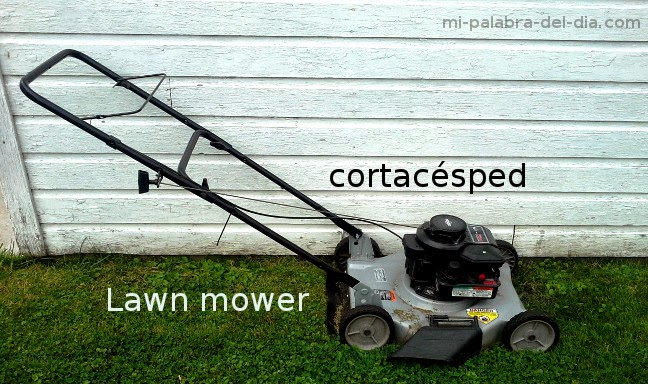
An image I shot for a Spanish blog. Terrible subject perspective, and by simply adjusting the angle of the shot the image would have been improved tremendously.

The lawn mower shot is probably the best example of this. The image almost looks warped by the angle it was shot at. If I hadn't been so lazy and simply squatted down  for 5 seconds to get a better angle or shot perspective the image would of came out so much better. In most cases your perspective should be eye level with your subject matter. The end result should be as if you were looking straight at the object. This isn't the case with every shot, and varies with subject matter, however, a good rule of thumb is shoot at eye level for basic shots.

Another good rule of thumb would be to take multiple shots from different angles. By doing this you will always get the best angle or perspective of the subject matter that you are trying to shoot. In this case I just snapped one quick simple shot and moved on to the next item. HUGE MISTAKE!

The day was cloudy, and the lighting was not very good either. If I would have just taken a moment to adjust the brightness level on the phone, this would of certainly improved the light quality of the image and made for a much better end result. The lighting is so terrible, I couldn't even improve it in my image editing program.

The end result is of course what you see above. A bland image of a lawn mower, with poor lighting and terrible perspective. I learned from this experience, and although I went ahead and used the photographs, I know the next time I shoot some images like this I'll put a little more tlc into it.  With just a few seconds of added effort to each shot I took, the end result would of been dramatically improved.

I made these three rules to follow from here on out.
  1. Always take multiple shots of a subject.
  2. Take each shot from a different angle.
  3. Adjust the brightness on the camera and use different setting for different angles. 
I feel that by following these 3 simple rules, even the most boring subject matter will have a much improved and a better quality end result. 
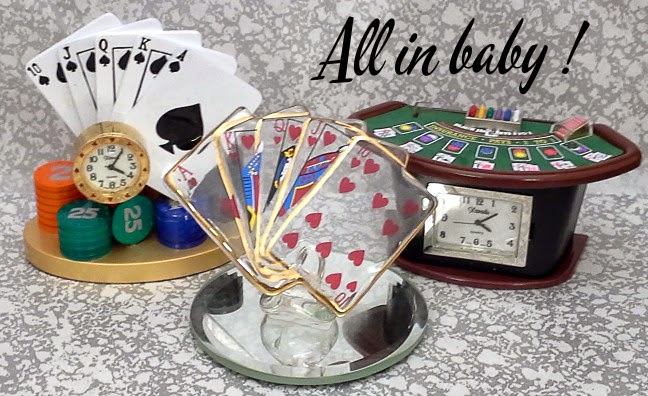
Although product photography is much different than shooting an object outdoors, you can see the difference in perspective and creativity. This image was taken for a friends blog using my phone camera, using outdoor light,  and the background is a paper bag with a pattern printed on it. Although this isn't great product photography, it does show what a little thought and creativity can do for otherwise boring subject matter.


August Update.

I've had a lot going on, and I think I'm going to be adding a bunch of stuff here shortly. Long story short, I've been taking a lot of pictures. Some good, some not so good, but I have been taking pictures, and of course learning.

As I stated in an earlier post, I've been putting some of my photos to use, on various websites and blogs. This has really helped me get motivated to snap more pictures.  One of the blogs is a Spanish blog, and for the Spanish blog I need to take pictures of literally everything from food, to buses, to houses and furniture. If there's a word for it, I need to take a picture of it.

Now that I've been snapping more shots with both my phone and my Nikon it's making me get a bit more creative with the types of images I'm taking, the perspective of the shot, and trying to create something a little more exciting out of somewhat boring subject matter.

This month I think I'm going to be getting back to adding some tutorials, and I'll definitely be posting some of the photographs I've been taking.

Tuesday, July 29, 2014

A Rainbow In The Backyard

I was hanging out in the backyard after a rain shower and was lucky enough  to catch this. The shot is taken with my Samsung Galaxy Stratosphere II Android device. I keep saying it but, I'm really impressed with the smart phone camera. They really have come a long way. If you need a camera for a quick shot, it certainly is better than no camera at all.

Image captured with a Samsung Galaxy Stratosphere II in Autumn mode. Edited in Gimp, bumped the contrast and brightness a bit. I also used the rotate tool and a slight crop. I love the smart phone camera in a pinch.
I love the clouds and the blue sky. My smart phone camera captures skies better than my Nikon D3000. I used the scene mode: Autumn thinking it would bring out the colors of the Rainbow and I think it did.

Monday, July 14, 2014

Car Show Time Of Year.

It's that time of year again. Time for some car show pix. I'll be adding more throughout the week.

This is a color photo, manipulated with the old photo effect in Gimp 2.8, then desaturated. Going for an old skool look but the modern cars in the background kind of ruin it. Anyway , here it is.

Old skool fail due to the modern cars in the background. You get what I was going for here though. I love the old rat rods !
A bunch of old rat rods displayed at a car show. I wish the modern cars weren't in the background, I think this image could of been really cool. It was a fun manipulation none the less.

Wednesday, June 18, 2014

Putting Some Photos To Use.


Its been about a year and a half since I started this hobby. In that time I've accumulated a lot of photos. Some photographs are good, some not so much. I started wondering what I should do with all these photos I've captured.

I uploaded a few to my http://morguefile.com/creative/newaeondesign. My policy with morguefile is that with every image I download and use , I upload an image to give back to the community. This isn't required, but I thought it would be a good personal policy. Currently I think I have 8 images there. If your on morguefile click on the link and follow me .

Autumn in Western New York. One or the images currently found in my morguefile account. You can use the image for just about anything and the license agreement can be found with the image.

I uploaded a few to my flickr.com. I'm new to flickr and just started using it. Most of my images are rights reserved and I watermark them, but I put a few others up under CC license. I tend to put my better shots and things I'm experimenting with on flickr.
One of the last images I took. This is one of my favorites and I uploaded it to flickr.

This barely even covers the amount of photos I've taken in the last year and a half. What good is a hobby if you can't make good use of it ? What to do ? I decided to merge 2 hobbies. I love learning Spanish, and I love taking photographs so I merged these two hobbies together and created a Learn Spanish blog. Enter mi-palabra-del-dia.com
One of the images being used on mi-palabra-del-dia.com. I love the way the dog looks like he's smiling in this picture. Not a really great photo, but more than acceptable for what it's being used for.

This has worked out really well for a couple reasons. 1) I now have motivation to take pictures of everything and use them on the Spanish language blog. 2) Even the pictures that aren't that great (most of them) I can put to use on the Spanish language blog. Every image gets labeled in Spanish now and uploaded to my blog. Well not every image but you get the point. 3) Last but not least I can use the blog as a makeshift portfolio of my graphic design work, and photography work to show to my New Aeon Design customers. I need to start putting a portfolio together.

Anyway, this has really helped me to get motivated, take more pictures, and get my work out there. That's really what this post is about. Finding things to keep you motivated, keep you snapping pictures, and of course putting those images to use !

Monday, June 16, 2014

Summer Flowers !

I love summer time photography ! In the summer time it seems like there's always something to get a picture of . All the light, the colors, the shapes, both in nature, and man made structures. Everything just seems to pop in the summer time.

Some blue flowers photographed in a Japanese style garden. I like the light and color in this image. One of the first images I've taken that I'm really happy with.

Monday, June 9, 2014

My photography related blog.

I think this is going to become my photography related blog. I just don't have the time to make this blog what I wanted it to be. I don't want to get rid of it either though. I think this is just going to be a place where I post some pics, maybe link up some tutorials, occasionally write something and add youtube videos.

I wanted so much more, but it just doesn't look like its going to happen. Things will slowly start to change around here. To the few people that follow this blog, thanks for following and hope you all stick around for the changes.

I'm going to try and post a few images a week, and maybe some stuff from other people as well. Enjoy.  

Thursday, May 8, 2014

Buffalo Skyline Edit

Playing around with Gimp I tried something different and I really liked the effect. The image shown is two images layered. The first image is the original, I adjusted the brightness and contrast a bit. I then duplicated that image and to the new layer I used colors/auto/equalize. This brought out the really cool colors in the clouds and a little more dimension in the buildings. I then dropped the opacity of that layer to 75%.

When the image was equalized though, some pixelization formed around the clouds. The only way I could remedy this was to lower the opacity of the equalized layer and then an image resize from 3872 x 2592  to 640 x 429.

I need to play with this effect a bit more.

Buffalo NY 2014. Interesting effect using multiple layers in Gimp with the equalize function and playing around with the opacity of the top layer.


Tuesday, May 6, 2014

A Day In The Park- Lighthouse

Towards the end of last summer I spent a day in the park. I took photos of everything I could possible find. It was a beautifully sunny day with wispy clouds in a blue sky. I came across this lighthouse and really liked the way the pond reflected the lighthouse. What you see in the background though is a combination of real and airbrushed clouds.

I found some cloud brushes, and played around with them a bit. I added some clouds to the image. I believe these clouds are the cloud brushes by Blazter which can be downloaded here.

After playing around with image manipulation software, and adding clouds, and sun, and light, etc, I can't help but wonder how much of any image is really what the photographer seen. So many images we see in magazines are illusions of reality.

Lighthouse in the park, artificial clouds added with the cloud brushes by Blazter. Download link in article.


Monday, May 5, 2014

Cat In His Window.

Well the warmer weather has almost reached Western New York. It's been unseasonably cold for April and May. My cat loves this window in the summer. So today's Pic A Day is my cat Buddy, chilling in front of his favorite window. As soon as the weather warms up a bit more I need to get out and get some photos.

Buddy chilling by his window.

Saturday, May 3, 2014

The Niagara River

This image was originally 3872 x 2592. By taking larger size images you'll have more room to work with in post processing and you will probably find more uses for your images.

These 2 photos were taken from the same image. By cropping different sections of the image you can come up with different perspectives of the image.

The picture was originally of two guys fishing off the side of a pier on the Niagara River. The photo was taken by leaning off the end of the pier, and hanging over the water. The image had to be straightened and this was the first edit.
As the post processing began, I thought this section of the image had a warmer feel to it. By shooting your images large, in a good quality setting, you have more room to edit, and get different perspectives of the same shot.

Wednesday, April 30, 2014

Old Grain Mill on Lake Erie.

An old grain mill found on Lake Erie. I don't know why but I really like the way this one came out. I adjusted the contrast and brightness a bit with Gimp. Added a little more blue with the color balance and that's it.
Old grain mill found at the mouth of Lake Erie right outside of Buffalo N.Y.

Monday, April 28, 2014

Jerry Garcia Wall Mural Pic A Day

Roaming around town, I decided to take a couple shots of the Jerry Garcia mural in Little Italy. This has been up for a long time and when it was first painted about 10 years ago some jerks shot it with paint ball guns. The whole neighborhood went nuts about it, they found the perpetrators, and nobody has ever messed with it since. YOU DON'T MESS WITH THE JERRY !

I've been trying to get out of my comfort zone with Gimp and try to experiment with some of the different filters and effects the program has to offer. The second image was my attempt at making a psychedelic sky. I made a simple mask around the rooftops with the free select tool, and then I used the fractal filter to get the trippy sky. For my first attempt I'm happy, but think I could get this better. I want to really start manipulating some of the different photos I've taken.

Jerry Garcia mural, Little Italy, North Buffalo NY
Jerry Garcia mural with Gimp sky manipulation. I created a mask with the free select tool. Used the fractal filter, and the sun looking thing is the sparks brush that comes with the program.

Friday, April 25, 2014

Pic A Day Wildflower Gimp Manipulation

A picture of some wild flowers. The image was manipulated in Gimp, with the filters/oilify filter. Then filters/distorts/lens distortion. The end result is the image shown.

Thursday, April 24, 2014

Something I Started Working On

O.k it's fifteen minutes till midnight and I just remembered I almost forgot my picture of the day. I kept busy today trying to get another blog off the ground. I have a huge love of the Spanish language and a ton of stock photography on my P.C. so I decided to start a Spanish language blog.

I thought I could use a lot of the stock photography for tutorials like the image shown.

Picture of pigeons being used for spanish tutorials.
So my picture of the day is of las palomas or in English pigeons. These were taken by the Niagara River near my home.

If you enjoy learning Spanish, check out mi-palabra-del-dia.blogspot.com
I also bought mi-palabra-del-dia.com but haven't pointed the domain yet.