 | |
| A huge Turkey hanging out in the cemetery. |
Wednesday, January 30, 2013
Daily Photo - What A Turkey !
Found this guy hanging out in the cemetery. This had to be the biggest Turkey I ever saw.

Thursday, January 24, 2013
After The Snow

This is one of the first photos I took with my camera that I was happy with. I decided to try and do a daily photo for the blog. This way I'll have a time frame journal of how I improve or digress.
Monday, January 21, 2013
Using Gimp To Enhance Brightness Contrast
I snapped some images of ducks the other day. I thought I would post a quick tutorial on using Gimp, to adjust the contrast and brightness of a photo.
Adjusting the contrast and brightness of a photograph in Gimp is a great way to make some subtle changes to a photo. By adjusting the contrast you can give the image a slightly richer look. This will lighten or darken the image, and also help bring out or remove some of the shadows. I also feel it helps to slightly enhance some of the colors.
This is a really simple process to do, and worth the 2 or 3 minutes it takes to do. The screen shot shows you where to go in Gimp. You can use your own photo or download the original unedited duck photo here at 4shared. The original file is jpeg, 2.3 megabytes, and 3872 x 2592. If you look at the before and after of this picture, the changes are very subtle and barely noticeable. However when you load an image in Gimp and try this for yourself you will see exactly what I'm talking about.

O.K., open Gimp and load either your image or my image into it. Now click on colors, and then find brightness - contrast. Click on brightness - contrast and when the dialog box opens, set the sliders as shown in the screenshot, or however you think they look nice. Your done. Quick, painless, it took less than 2 minutes, and added a little special something to your image. I'm currently doing this to just about every image I process. When your done, click file, export, and then export the image as whatever-filename.jpg.Here are the before and after pix,very subtle and barely noticable with the naked eye. As an amateur photographer though, we can use all the extra help we can get. Play around with different images using this technique and you'll be surprised at what this little adjustment can do for some of your pictures.
Thanks for reading and happy photographing.
Adjusting the contrast and brightness of a photograph in Gimp is a great way to make some subtle changes to a photo. By adjusting the contrast you can give the image a slightly richer look. This will lighten or darken the image, and also help bring out or remove some of the shadows. I also feel it helps to slightly enhance some of the colors.
This is a really simple process to do, and worth the 2 or 3 minutes it takes to do. The screen shot shows you where to go in Gimp. You can use your own photo or download the original unedited duck photo here at 4shared. The original file is jpeg, 2.3 megabytes, and 3872 x 2592. If you look at the before and after of this picture, the changes are very subtle and barely noticeable. However when you load an image in Gimp and try this for yourself you will see exactly what I'm talking about.

O.K., open Gimp and load either your image or my image into it. Now click on colors, and then find brightness - contrast. Click on brightness - contrast and when the dialog box opens, set the sliders as shown in the screenshot, or however you think they look nice. Your done. Quick, painless, it took less than 2 minutes, and added a little special something to your image. I'm currently doing this to just about every image I process. When your done, click file, export, and then export the image as whatever-filename.jpg.Here are the before and after pix,very subtle and barely noticable with the naked eye. As an amateur photographer though, we can use all the extra help we can get. Play around with different images using this technique and you'll be surprised at what this little adjustment can do for some of your pictures.
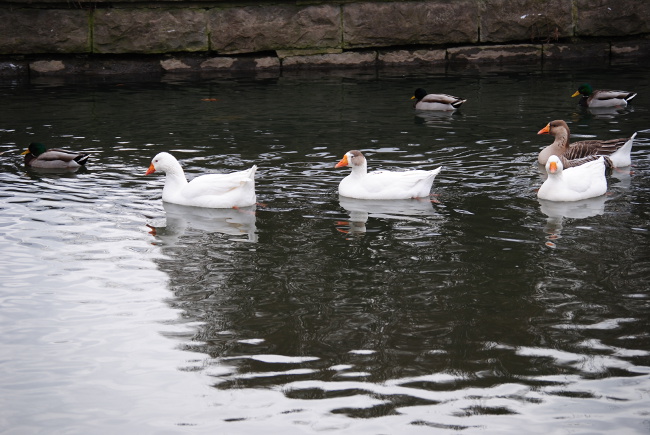 | |
| After changes, you can see the difference in the rocks, the shadowing in the corners, and also a little more color in the bills of the ducks |
 |
| .original |
Friday, January 18, 2013
The Crow
I went out and took some pictures today. I snapped this and was really happy with how it came out. I've been playing around with my aperture, and still really don't understand what I'm doing. Every picture I took , I took with a high aperture and a low aperture, and somewhere in the middle. Except this bird. He was just flying by, I have no clue what my aperture was set at, and discovered this when I got home. I've got about four shots of him in various forms of flight and they all came out like this.


Monday, January 14, 2013
Exorcising Demon Deer Eyes
As I stated in my last post, I got lucky the other day and came across these deer. Unfortunately it was right at dusk, and I really don't know how to shoot in poor light. These deer were hanging out on the side of the road by a rest area, I pulled up and left my headlights on them and they just hung out. I grabbed my camera, stepped out of the car, and the little ladies let me walk right up to them. I was roughly about 10 feet away. Between using my flash, and the car headlights shining on them, I got some terrible pictures of some demon deer. I don't think they were demon, but red eye removal just wasn't going to fix these demon eyes.
I did some experimenting in Gimp 2.8 and figured out a decent way to remove the light from their eyes. This is really simple and if you use Photoshop you should be able to accomplish this same effect.
Here's how this works. Load the deer image in Gimp, or whatever photo editing program your using. Go to the layers box on the right and click add new layer. Towards the top of the program screen where it says file, edit, view, click on view, and then zoom to about 400%. Now click on the Ellipse tool, and make an ellipse around one of the bright dots in the deers eyes. Then hit the shift key and do the same to the other eye.
Now click on the color picker tool, and click it right on the outside of the circle you selected of one of the eyes. Click on the brush tool and fill the circle with the color you selected. Now repeat this process with the other eye.
Now go to the top of the program screen and click select none. Now click on the smudge tool, and make your brush size about 2 or 3 pixels. Now smudge the layer with just the eyes and little bit where there's a pixel or 2 you missed.Go over to the layers bar and adjust the opacity a bit until the color blends with the eyes. That's it your done. If you did everything correct you should have an image that looks like this.
This is a crude but effective fix. With a little practice I think you can see the potential this effect has. Hopefully I'll have some better pix to post soon. At least these photo's made for a decent tutorial.If your bored play around with the contrast and brightness a bit and see if you can adjust the light a bit better.
Thanks for reading and I hope this Gimp tutorial was helpful. Feel free to leave any comments positive or negative. Thanks for following and check back soon for updates.
 |
| Everything you need to use should be circled. |
I did some experimenting in Gimp 2.8 and figured out a decent way to remove the light from their eyes. This is really simple and if you use Photoshop you should be able to accomplish this same effect.
 |
| Look at that beauty, if I only got there 10 minutes earlier. The redeye removal filter wasn't going to fix this. |
Here's how this works. Load the deer image in Gimp, or whatever photo editing program your using. Go to the layers box on the right and click add new layer. Towards the top of the program screen where it says file, edit, view, click on view, and then zoom to about 400%. Now click on the Ellipse tool, and make an ellipse around one of the bright dots in the deers eyes. Then hit the shift key and do the same to the other eye.
Now click on the color picker tool, and click it right on the outside of the circle you selected of one of the eyes. Click on the brush tool and fill the circle with the color you selected. Now repeat this process with the other eye.
Now go to the top of the program screen and click select none. Now click on the smudge tool, and make your brush size about 2 or 3 pixels. Now smudge the layer with just the eyes and little bit where there's a pixel or 2 you missed.Go over to the layers bar and adjust the opacity a bit until the color blends with the eyes. That's it your done. If you did everything correct you should have an image that looks like this.
 |
| Crude but effective. With a little practice I think I could master this technique. |
This is a crude but effective fix. With a little practice I think you can see the potential this effect has. Hopefully I'll have some better pix to post soon. At least these photo's made for a decent tutorial.If your bored play around with the contrast and brightness a bit and see if you can adjust the light a bit better.
Thanks for reading and I hope this Gimp tutorial was helpful. Feel free to leave any comments positive or negative. Thanks for following and check back soon for updates.
Friday, January 11, 2013
Lens Cleaning Nikon Video Tutorial
So I bring my camera out today while I'm running some errands. It's raining, dark skies, poor light, I'm out all day and don't see one interesting thing to shoot in the type of day light I had to work with. I did notice a couple things that I'll shoot on a day with better light. Finally at about dusk I'm driving up a road and spot some deer. More on these lil dood's tomorrow. I get excited, grab my camera, set the lens cap on my lap while I'm making some quick adjustments to my camera, jump out of the car, and start taking pictures. The last of the light goes down, I hop back into my car, only to discover, I can't find my lens cap :(. I open the car door, and there next to the car is my lens cap covered in mud. NOT COOL !
I blow it off, stick the camera in my bag, and head home. When I get home I clean the lens cap with a new toothbrush to get all the dirt out of the crevices of the the lens cap, run it under water and stick it in the dish drainer to dry it off. I wipe off the lens with the soft part of my sweater, place a plastic bag over the lens while the caps drying and I'm done. WTF , I'm a newb, and at times a bit dumb, or at least do dumb things. This technique worked fine for me but I decided to look it up on the internet and see what the proper way to clean a lens, and lens cap would be. I found this video from Nikon on Youtube and thought I would share it here.
I get paid bi-weekly and am planning on spending a portion of my check every other week on camera equipment. I was planning on buying a tripod this week, but I ended up spending close to $100.00 on a service plan / camera insurance. The whole camera is covered and even if I drop a lens and break it , it gets replaced. Being the clumsy oaf I am at times, it sounded like a good idea. Next week I think I'll be investing in a cleaning kit. After today's fiasco it'll probably be money well spent !
I blow it off, stick the camera in my bag, and head home. When I get home I clean the lens cap with a new toothbrush to get all the dirt out of the crevices of the the lens cap, run it under water and stick it in the dish drainer to dry it off. I wipe off the lens with the soft part of my sweater, place a plastic bag over the lens while the caps drying and I'm done. WTF , I'm a newb, and at times a bit dumb, or at least do dumb things. This technique worked fine for me but I decided to look it up on the internet and see what the proper way to clean a lens, and lens cap would be. I found this video from Nikon on Youtube and thought I would share it here.
I get paid bi-weekly and am planning on spending a portion of my check every other week on camera equipment. I was planning on buying a tripod this week, but I ended up spending close to $100.00 on a service plan / camera insurance. The whole camera is covered and even if I drop a lens and break it , it gets replaced. Being the clumsy oaf I am at times, it sounded like a good idea. Next week I think I'll be investing in a cleaning kit. After today's fiasco it'll probably be money well spent !
Tuesday, January 8, 2013
Please Help Me !
Dear friends, fellow bloggers, and countrymen... Citizens of earth, and denizens of the world wide web. I call out to you in my hour of need, in hopes that someone ... anyone, might be able to help me with this monumental problem that must be solved !
This post will be tagged under advice and is slightly off topic, but I assure you there is a method to my madness.First let me show you the problem and quickly give you the advice part of this post.

This is an amateur photograph of a burrito. Not only is it an amateur photograph of a burrito, but it's also a crappy amateur photograph, of a very crappy burrito ! Why you might ask would the humble host of My Amateur Photo, post a crappy picture of a very crappy burrito ? For two reasons. One being the first bit of advice I was given when I got my camera and that was to take pictures of everything. That's just what I've been doing. I've taken pictures of dinner place settings, my parents, my pets, my food, the ground, the sky, the stars, and the moon, planes, trains, automobiles and anything else I could zoom in on ! The more pictures you take the more you will learn. I'm also finding this theory to be very true, I've learned a lot recently and occasionally snap a decent shot due to this advice. This crappy amateur photo, of this crappy burrito, is my proof to the world that I've been doing just that. Taking pictures of everything.

Now back to my problem. I live in New York state. I moved out west for a couple years and got used to real Mexican food. After tasting the heavenly deliciousness of real Mexican cooking, a standard New York state burrito just ain't cutting it. We have some of the best Italian restaurants, and some really good Puerto Rican cuisine, but we just can't figure out Mexican around here. After taking the crappy amateur photo of this very crappy burrito, it hit me like a ton of bricks ! Why not post the crappy picture of the crappy burrito on the internet in hopes that someone, anyone, might be able to point me to a webpage, or recipe site with a really good Mexican burrito recipe. FOR THE LOVE OF GOD,AND ALL THAT'S GOOD SOMEONE PLEASE HELP ME. It's been 10 years since I've had a real burrito.
I've looked at recipe sites, I've tried to make my own, and I just can't find the proper recipe. Somewhere on the WORLD WIDE WEB, there has to be an authentic Mexican burrito recipe, filled with rice, and beans, and delectable beef simmered in delicious herbs and spices. I hate to break it to you N.Y. but a burrito is not some fried ground beef, with a couple dashes of hot sauce, some lettuce, tomato and onion ! SOMEBODY PLEASE HELP ME.

Now this burrito came from a friends restaurant and in all fairness to the chef by N.Y. standards it's a pretty good burrito. Might possibly be the best burrito in the city I live in, it's just not West Coast Mexican cooking. If you should come upon this post, and you recognize this as your burrito, I ate the whole thing and by N.Y. standards it's not as bad as I'm making it out to be. It just really left me craving for that West Coast Mexican flavor.
On a closing note, if you've read this far, take pictures of everything. That's how you learn. The more pictures you take the more opportunities you will get to see how your camera operates in different light settings. What lens to use and so on and so forth. The more pix you take, the more you will learn, and the better your pictures will start to come out. ALL KIDDING ASIDE , IF I DON'T GET A REAL BURRITO SOON, I'M GONNA GO NUTS, SO IF YOU KNOW OF A WEB LINK TO A REAL MEXICAN BURRITO RECIPE PLEASE POST THE LINK IN THE COMMENTS. I assure you the God's will bless you repeatedly for this one act of kindness and I will be forever in your debt !
This post will be tagged under advice and is slightly off topic, but I assure you there is a method to my madness.First let me show you the problem and quickly give you the advice part of this post.

This is an amateur photograph of a burrito. Not only is it an amateur photograph of a burrito, but it's also a crappy amateur photograph, of a very crappy burrito ! Why you might ask would the humble host of My Amateur Photo, post a crappy picture of a very crappy burrito ? For two reasons. One being the first bit of advice I was given when I got my camera and that was to take pictures of everything. That's just what I've been doing. I've taken pictures of dinner place settings, my parents, my pets, my food, the ground, the sky, the stars, and the moon, planes, trains, automobiles and anything else I could zoom in on ! The more pictures you take the more you will learn. I'm also finding this theory to be very true, I've learned a lot recently and occasionally snap a decent shot due to this advice. This crappy amateur photo, of this crappy burrito, is my proof to the world that I've been doing just that. Taking pictures of everything.

Now back to my problem. I live in New York state. I moved out west for a couple years and got used to real Mexican food. After tasting the heavenly deliciousness of real Mexican cooking, a standard New York state burrito just ain't cutting it. We have some of the best Italian restaurants, and some really good Puerto Rican cuisine, but we just can't figure out Mexican around here. After taking the crappy amateur photo of this very crappy burrito, it hit me like a ton of bricks ! Why not post the crappy picture of the crappy burrito on the internet in hopes that someone, anyone, might be able to point me to a webpage, or recipe site with a really good Mexican burrito recipe. FOR THE LOVE OF GOD,AND ALL THAT'S GOOD SOMEONE PLEASE HELP ME. It's been 10 years since I've had a real burrito.
I've looked at recipe sites, I've tried to make my own, and I just can't find the proper recipe. Somewhere on the WORLD WIDE WEB, there has to be an authentic Mexican burrito recipe, filled with rice, and beans, and delectable beef simmered in delicious herbs and spices. I hate to break it to you N.Y. but a burrito is not some fried ground beef, with a couple dashes of hot sauce, some lettuce, tomato and onion ! SOMEBODY PLEASE HELP ME.

Now this burrito came from a friends restaurant and in all fairness to the chef by N.Y. standards it's a pretty good burrito. Might possibly be the best burrito in the city I live in, it's just not West Coast Mexican cooking. If you should come upon this post, and you recognize this as your burrito, I ate the whole thing and by N.Y. standards it's not as bad as I'm making it out to be. It just really left me craving for that West Coast Mexican flavor.
On a closing note, if you've read this far, take pictures of everything. That's how you learn. The more pictures you take the more opportunities you will get to see how your camera operates in different light settings. What lens to use and so on and so forth. The more pix you take, the more you will learn, and the better your pictures will start to come out. ALL KIDDING ASIDE , IF I DON'T GET A REAL BURRITO SOON, I'M GONNA GO NUTS, SO IF YOU KNOW OF A WEB LINK TO A REAL MEXICAN BURRITO RECIPE PLEASE POST THE LINK IN THE COMMENTS. I assure you the God's will bless you repeatedly for this one act of kindness and I will be forever in your debt !
Subscribe to:
Posts (Atom)